1. Home
  2. What Is a VPS
Complete guide 2026

What is VPS?

Learn everything about Virtual Private Servers (VPS): how they work, advantages, use cases and when to move from shared hosting.

VPS plans from US$ 12.31 /mo

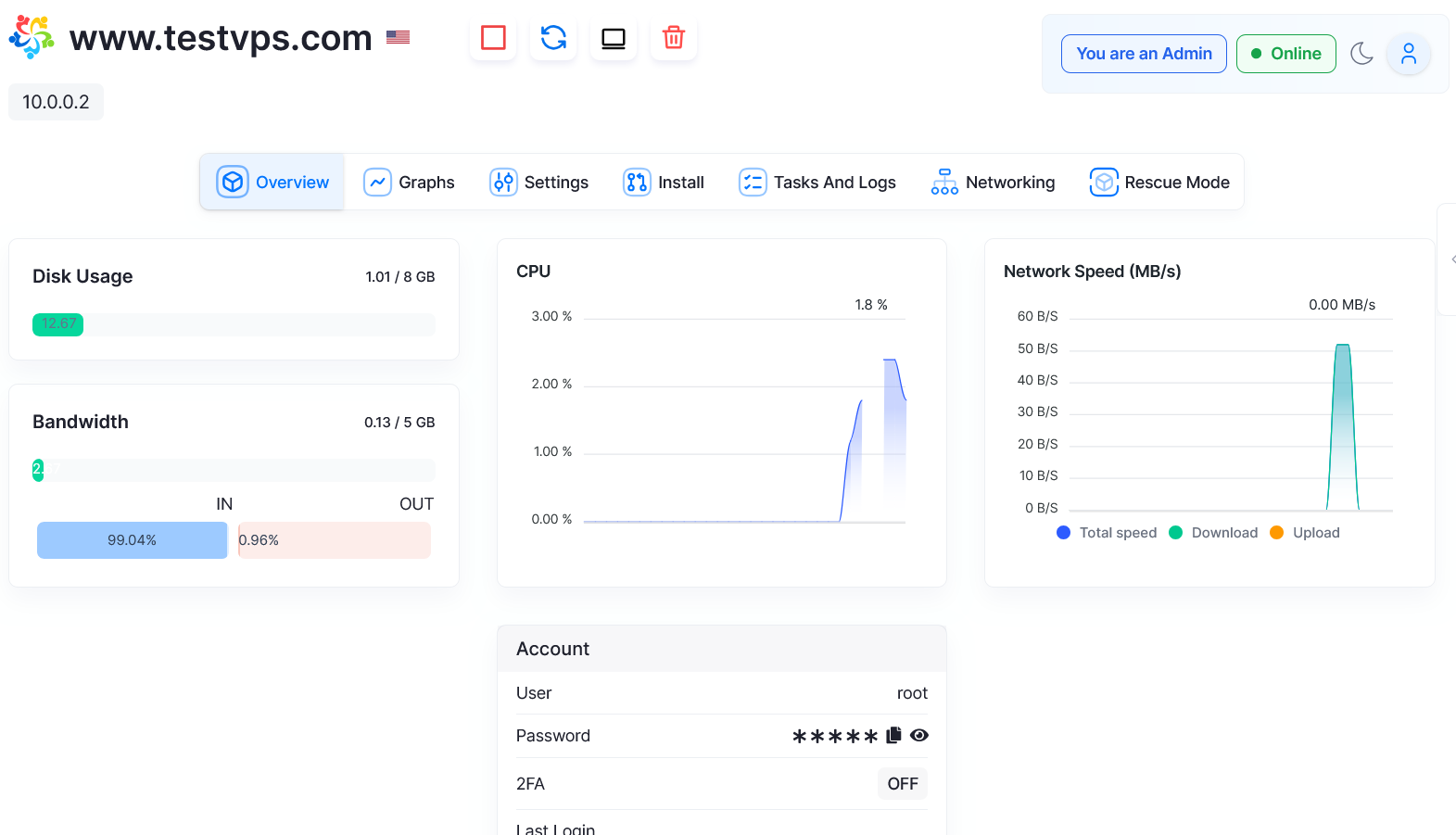
Control panel of a VPS server
FeaturesDedicated
AccessFull root

What is VPS?

VPS stands for Virtual Private Server. A VPS is a virtual machine that works like an independent dedicated server, but actually runs inside a larger physical server, alongside other VPSs.

Think of an apartment building: the building is the physical server and each apartment is a VPS. You have your own private space, exclusive resources and complete independence from your neighbors.

Unlike shared hosting, where you split resources with hundreds of sites, a VPS gives you dedicated, guaranteed CPU, RAM and storage, plus full control over the operating system, software installation and advanced settings.

The anatomy of a VPS

How does a VPS work? One physical server, many virtual servers.

Independent operating system

You install the operating system you want (Ubuntu, Windows Server, AlmaLinux, etc.) and configure it as if it were a dedicated physical server, with full root/administrator access.

Guaranteed dedicated resources

Each VPS gets a fixed amount of RAM and disk, for example 4 GB of RAM and 80 GB of SSD. These resources are yours and do not fluctuate with other users' activity.

Management through the control panel

You manage the VPS through a web panel (Virtualizor): restart, reinstall the system, access the console, monitor resources and upgrade without opening tickets.

Virtualization (hypervisor)

Specialized software (KVM) splits the physical resources into isolated virtual environments. Each VPS is independent from the others.

Powerful physical server

It all starts with a high-capacity physical server in a professional datacenter, equipped with modern CPUs (Xeon, EPYC), plenty of RAM and fast storage (NVMe SSD).

VPS or shared hosting?

VPS vs shared hosting vs dedicated server: understand the differences and which one to choose for your project

Shared hosting

  • Cheapest
  • Easy to use (cPanel)
  • Maintenance included
  • Shared resources
  • Variable performance
  • No root access
  • Software limitations

Ideal for: small sites, blogs, portfolios, basic WordPress.

View web hosting

Dedicated server

  • Entire physical server
  • Maximum performance
  • All of the machine's resources are yours
  • Total isolation
  • Very expensive
  • Complex to manage

Ideal for: enterprise applications, massive databases, very high traffic.

At HostMF, VPS plans start at US$ 12.31/mo.

Expert tip

Most projects that outgrow shared hosting find the balance between cost and performance in a VPS. A dedicated server is only worth it for very large applications (over 100 thousand visitors per day).

What is a VPS used for?

Main use cases and practical applications of a VPS server

E-commerce and online stores

WooCommerce, Magento and PrestaShop with stable performance and improved security. Guaranteed resources even during sales peaks.

Hosting multiple sites

Agencies and developers can host dozens of client sites on a single VPS, each with its own domain and configuration.

Web applications and APIs

Node.js, Python (Django/Flask), Ruby on Rails, Go: any stack, with full control over versions and dependencies.

Trading and Meta Trader

Forex trading bots running 24/7 with low latency, without depending on your computer being on.

See VPS for trading

Databases

MySQL, PostgreSQL, MongoDB and MSSQL with dedicated resources for complex queries and large volumes of data.

Game servers

Minecraft, CS:GO, Rust, ARK, FiveM: dedicated performance for gaming communities.

See VPS for gaming

Windows applications

ASP.NET, MSSQL Server and .NET applications with full RDP (Remote Desktop) access.

Meet the Windows VPS

Development environment

Testing, staging, CI/CD and isolated environments to develop without affecting production.

See VPS for developers

Email server

Your own email server with a dedicated IP, to improve deliverability and stay out of the spam folder.

Remote desktop / virtual PC

Access a Windows or Linux computer from anywhere via RDP or VNC.

View remote desktop

Private VPN

Create your own VPN (OpenVPN, WireGuard) for privacy and security while browsing.

Backup server

Secure remote storage for automatic backups of critical data and disaster recovery.

What are the pros and cons of a VPS?

An honest assessment: what you gain and what you need to consider

VPS advantages

  • Consistent, predictable performance with dedicated resources
  • Easy vertical scalability (upgrade RAM and CPU at any time)
  • Full control: root access to install any software
  • Complete isolation: other users' problems do not affect you
  • Dedicated IP included (important for email, SSL and SEO)
  • More security: you configure the firewall, fail2ban, etc.
  • Great value compared to a dedicated server
  • Ability to host multiple sites and applications
  • Free choice of operating system (Linux or Windows)
  • Ideal for learning server administration

VPS disadvantages

  • Requires technical knowledge (Linux, SSH, server configuration)
  • You are responsible for maintenance, updates and security
  • More expensive than shared hosting (3 to 10 times the price)
  • Initial setup can take a while for beginners
  • You can break something if you do not know what you are doing
  • Backup is your responsibility (unless you purchase an add-on)
  • Resources are still limited (it is not a dedicated server)
  • A managed VPS costs more (but solves the technical side)

A solution for beginners

Want a VPS but have no technical knowledge? We offer VPS with pre-installed control panels that make management much easier. All come pre-configured and ready to use, with no need to touch the command line. We also offer support for setting up tools such as RunCloud, ServerPilot and Ploi.

When should you move to a VPS?

Clear signs that it is time to leave shared hosting

A site that is always slow

Load times above 3 seconds, pages freezing, frequent timeouts: shared hosting can no longer handle your traffic.

Resource limits exceeded

Emails from your provider warning that you exceeded CPU or RAM, processes being killed, your site going down at peak hours.

Fast-growing traffic

You have passed 10 thousand visitors per month, traffic peaks take your site down and you do not want to lose conversions to slowness.

E-commerce with sales

Your online store has started selling well and you cannot risk the site going down on Black Friday or during paid campaigns.

Several sites to manage

An agency or freelancer with 5 or more client sites: one VPS costs less than several shared hosting plans.

You need specific software

You want to install Node.js, Python, a specific PHP version, Redis or MongoDB, things that shared hosting does not allow.

You need a dedicated IP

For a professional email server, custom SSL or applications that require a fixed, exclusive IP.

You want to learn DevOps and sysadmin

You want full control to learn Linux, configure servers and test new technologies in a real environment.

Rule of thumb

If your site gets more than 1,000 visits per day, if you make money from it or if you manage 3 or more sites, it is probably time for a VPS.

View VPS plans

VPS plans to get started

From US$ 12.31/mo, with NVMe SSD, unlimited traffic, immediate activation and no lock-in

Canada Sold out

2GB RAM

2 vCPU 2.0GHz · DDR4

  • 40GB NVMe Adjustable disk
  • 100Mbps Speed
  • Unlimited Traffic
from US$ 8.95 /month
View plan details

Frequently asked questions about VPS

The most common questions about Virtual Private Servers

What does VPS mean?

VPS stands for Virtual Private Server. It is a virtual machine that works like a dedicated server inside a larger physical server, with exclusive resources and complete isolation.

What is the difference between a VPS and shared hosting?

With shared hosting, you share all resources (CPU, RAM, disk) with hundreds of other sites. With a VPS, you get guaranteed dedicated resources, more control, better performance and root access to the server. It is like the difference between renting a room in a shared apartment and having your own apartment.

Is a VPS better than shared hosting?

It depends on your needs. For small sites with little traffic, shared hosting is enough and cheaper. A VPS is better when you need more control, guaranteed performance, custom software, or when your site gets a lot of traffic. It is the natural next step when you outgrow shared hosting.

Do I need technical knowledge to use a VPS?

It depends on the type. A managed VPS is easy to use and comes with a control panel (cPanel, Plesk). An unmanaged VPS requires command-line knowledge of Linux or Windows. If you can use cPanel, you can manage a VPS with a control panel. For a VPS without a panel, server administration knowledge is recommended.

How much does a VPS cost?

The cost of a VPS depends on its resources (RAM, CPU, disk) and the datacenter location. A VPS in Brazil is usually more expensive than in Canada or the US because of infrastructure costs. At HostMF, VPS plans start at US$ 12.31 per month.

Does a VPS have a dedicated IP?

Yes. A VPS comes with at least one exclusive dedicated IP address, and you can add more IPs as needed. This matters for SSL, email, specific applications and server reputation.

Can I host multiple sites on one VPS?

Yes. With a VPS you can host as many sites as you want, limited only by the server's resources (RAM, CPU, disk). It is ideal for agencies, developers and anyone managing several projects: you configure domains, subdomains and applications without restrictions.

Is a VPS scalable?

Yes. You can upgrade resources (RAM, CPU, disk) at any time, usually without losing data. Start small and grow as your project grows. You can scale vertically (more resources) or horizontally (more servers).

What is the difference between Windows VPS and Linux VPS?

Linux VPS is more common, lightweight and cheaper, ideal for PHP, Python and Node.js. Windows VPS runs Windows Server, supports ASP.NET and MSSQL, has a graphical interface (RDP) and is essential for Microsoft applications. The choice depends on the technologies you use.

Does a VPS have automatic backup?

It depends on the provider. Some include automatic backup, others offer it as a paid add-on. It is essential to also make your own backups, using tools such as rsync, Duplicity or cloud backup solutions for redundancy.

Ready to move to a VPS?

VPS plans from US$ 12.31/mo with immediate activation, NVMe SSD, 24/7 support and Anti-DDoS Protection in our Canada and Europe datacenters. 7-day guarantee and no lock-in.

Need help?

If you are in doubt or need help choosing your plan, contact us via chat right now!

Response in minutes
24/7 Support
5-star service
Google Reviews

What our customers say

See real experiences from people who trust HostMF

4,9
214 reviews
See all on Google
marlon almeida Ferreira
há 3 meses

otimo servico breve voltarei a usar

Anderson Viana
há 5 meses

serviço top e atendimento muito rápido recomendo demais

Rodrigo Augusto
há 8 meses

Pessoal ótimo atendimento resolveu meu problemas em minutos.
Recomendo demais essa empresa

Alice Amorim Garci
há 8 meses

otimo atendimento muito rapido obrigado

Mateus Santos
há 9 meses

Profissionais,recomendo não te deixa na mão.....a qualquer momento do dia e semana... eles estão lá.......confere!!!!!

João Paulo Moraes
há 1 ano

Prestam excelente serviço e com rapidez.

Matoso Feitosa
há 1 ano

serviço muito bom vale apena pelo custo beneficio

Aceinfo Aceinfo
há 1 ano

Servico muito bom. Recomendo.

Lindomar Sampaio
há 1 ano

Adquiri uma VPS recentemente e estou muito satisfeito com o custo benefício e estabilidade.

Jefferson Luis dos Reis
há 1 ano

Uso há alguns anos, tem preço justo, boa estabilidade e bom suporte.

Want to see more reviews?

See all reviews on Google
Cookies

By using this site, you automatically agree that we use cookies. For what?

I agree